In MATLAB, the natural logarithm (ln) is calculated using the log() function, not ln(). This function returns the natural logarithm of each element in an array or scalar, utilizing the base e constant (~2.718) to provide high-precision results for engineering and scientific computing.
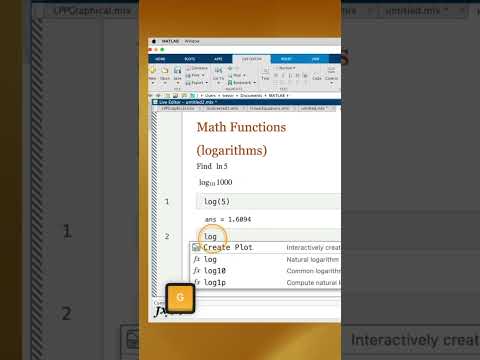
Image taken from the YouTube channel Harare Maths , from the video titled Matlab | logarithms .
MATLAB ln Syntax: Understanding the log() Function
The MATLAB ln equivalent is the log(x) function, which computes the natural logarithm (base e) for any scalar, vector, or matrix input.
When transitioning from a scientific calculator to a programming environment, the most common hurdle is the nomenclature of the matlab ln command. While the mathematical shorthand for the natural logarithm is "ln," MATLAB adheres to the ISO standard and computer science convention where the log() function refers specifically to the logarithm with base e.
This naming convention is foundational to technical computing. If you attempt to use a literal ln(x) command in the Command Window, MATLAB will return an error stating that the function is undefined. Understanding that log() is the natural log is the first step for any engineer or student using the platform for calculus or data analysis.
Basic Scalar Calculation
To calculate the natural logarithm of a single number, the syntax is straightforward: y = log(x). For instance, if you input log(exp(1)), MATLAB will return 1, confirming that the function operates on base e. This scalar operation is highly efficient and is often used to solve for variables in exponential growth equations.
Because MATLAB uses double-precision floating-point numbers by default, the results of your matlab ln calculations will be accurate to approximately 15 decimal places. This precision is vital when performing iterative calculations where rounding errors could compound over time.
Vectorization and Array Performance
One of MATLAB’s greatest strengths is its ability to handle arrays without explicit loops. If you pass a vector or a matrix into the log() function, MATLAB applies the natural logarithm to every individual element within that structure. This is known as element-wise operation.
For example, if you have a dataset data = [1, 10, 100], calling log(data) will instantly return the natural log for all three values. This vectorized approach is significantly faster than using a for loop, especially when dealing with large-scale engineering datasets or high-frequency signal processing arrays.
- Scalar syntax:
y = log(x)- used for individual numeric values. - Array syntax:
Y = log(X)- used for element-wise matrix and vector transformations. - High-precision base-e constant: Utilize
exp(1)to represent the value of e (approx. 2.71828) within your scripts.
Takeaway: Always use log() for natural logs; MATLAB does not recognize 'ln' as a command.
Differentiating from common base-10 logs.
Avoiding the log() vs. log10() Confusion
Unlike handheld calculators that use 'log' for base 10, MATLAB uses log() for natural logs and log10() for common logarithms.
The "Log Confusion" paradox is a frequent source of bugs in engineering scripts. In most secondary education settings, "log" implicitly means base 10. However, in the context of matlab ln, this assumption leads to massive magnitude errors in calculations like decibel levels or Richter scale modeling. To calculate a common logarithm in MATLAB, you must explicitly use the log10() function.
This distinction is critical for maintaining the integrity of your mathematical models. Forgetting to append the "10" to the function name can result in a value that is approximately 2.3026 times larger or smaller than intended, as the natural log and common log are related by the change-of-base formula.
Comparing Base e vs. Base 10
The choice between log() and log10() depends entirely on the physical phenomenon you are modeling. Natural logarithms (base e) are typically found in biological growth, radioactive decay, and continuous interest calculations. Common logarithms (base 10) are more frequent in human-centric scales like pH levels, sound intensity (dB), and earthquake magnitude.
In MATLAB, these functions are optimized for their respective bases. While you could technically calculate a base-10 log using log(x)/log(10), using the native log10() function is more readable and computationally direct.
Common Syntax Errors for Beginners
New users often encounter the "Undefined function or variable" error when trying to use ln(). Another subtle error is using log() when the user actually intends to perform a base-10 operation for a plot or a specific engineering standard. Always verify the base requirements of your specific formula before coding the function in MATLAB.
| Function | Base | Usage |
|---|---|---|
| log() | e (2.718) | Natural Log (matlab ln) |
| log10() | 10 | Common Log |
| log2() | 2 | Binary Log / Information Theory |
Takeaway: Double-check your function choice to prevent magnitude errors in your results.
Handling non-positive and complex inputs.
Calculating MATLAB ln for Negative and Complex Numbers
MATLAB produces complex number results for negative or complex inputs in the log() function, rather than returning an error or NaN.
In many basic programming languages, attempting to find the natural log of a negative number results in a domain error. However, MATLAB is designed for high-level engineering and physics, where the complex plane is a standard part of the workspace. When you pass a negative real number to the matlab ln function, it utilizes the complex identity to return a result in the form of a + bi.
This behavior is essential for applications in alternating current (AC) circuit analysis and control systems. Instead of halting your script, MATLAB provides the complex logarithm, allowing the phase and magnitude information to persist through the calculation pipeline.
Logarithms of Negative Reals
If you calculate log(-1) in MATLAB, the result is 0.0000 + 3.1416i. This occurs because, in the complex plane, -1 is represented as e raised to the power of i*pi. The log() function extracts that exponent. The real part of the result corresponds to the log of the absolute value, while the imaginary part represents the phase angle in radians.
This feature allows engineers to work with transfer functions and frequency responses without fearing that a transient negative value will crash the entire simulation. It treats the number line as a subset of the complex plane.
The Complex Logarithm Domain
For any complex number z, the natural log is defined as the log of its magnitude plus i times its argument (angle). MATLAB handles this calculation automatically using the formula Log(z) = log(abs(z)) + i*angle(z). This is known as the principal value of the complex logarithm.
Using matlab ln with complex inputs is common in conformal mapping and fluid dynamics. By supporting these inputs natively, MATLAB simplifies the code required to analyze vector fields and potential flows, where the logarithmic transformation is a standard tool for mapping circular domains to rectangular ones.
Takeaway: MATLAB's native support for complex numbers allows for seamless engineering transitions in the frequency domain.
Applying these concepts to real-world data.
Practical Engineering Examples Using MATLAB log
Natural logarithms in MATLAB are essential for exponential decay modeling, signal processing, and data normalization via logarithmic scaling.
In the field of data science and engineering, the matlab ln function is rarely used in isolation. It is frequently employed to linearize data that follows an exponential trend. By taking the natural log of an exponential dataset, you can perform linear regression to determine growth rates or decay constants with high accuracy.
This process is foundational in chemistry for reaction kinetics and in civil engineering for structural damping analysis. By transforming the "curved" data into a straight line using log(), the underlying physics becomes much easier to interpret and quantify.
Modeling Exponential Decay
Exponential decay is governed by the equation N(t) = N0 * exp(-k*t). To find the decay constant k from experimental data, engineers take the natural log of both sides. In MATLAB, this involves applying log() to the ratio of the current value over the initial value. This allows for a quick calculation of half-life or time constants in electrical RC circuits.
By using the matlab ln function, you can solve for the time variable or the rate constant in a single line of code, making it a staple in automated testing and measurement scripts.
Logarithmic Scaling in Data Visualization
When visualizing data that spans several orders of magnitude, standard linear plots often hide important details in the lower values. MATLAB provides specialized plotting functions that incorporate logarithmic scaling automatically, though they rely on the same underlying principles as the log() function.
- semilogx(): Creates a plot with a logarithmic scale for the x-axis.
- semilogy(): Useful for visualizing exponential growth on the y-axis.
- loglog(): Applies logarithmic scaling to both axes, ideal for power-law relationships.
These functions allow you to see trends in frequency response or population growth that would otherwise be compressed against the axes. Utilizing the log() function for data normalization before plotting is also a common technique in machine learning to reduce the skewness of a distribution.
Takeaway: Logarithmic functions are the backbone of data normalization and growth rate analysis.
Summarizing key takeaways and FAQs.
To see these logarithmic functions in action and understand the difference between element-wise and matrix operations, watch this concise video walkthrough.
Visual Guide: Implementing Natural Logarithms in MATLAB
Common Questions About MATLAB ln
Quickly resolve common syntax hurdles and logic errors related to natural logarithms with these expert answers.
Does MATLAB have an ln() function?
No, MATLAB uses the log() function to calculate the natural logarithm.
Using the command ln() will result in an "Undefined function or variable" error. This naming convention follows standard computer science practices found in languages like C and Fortran.
How do I calculate log base 10?
Use the log10() function for common logarithms in MATLAB.
While log() handles the natural log (base e), log10() is the specific built-in function for base 10. For any other base n, use the change-of-base formula: log(x)/log(n).
What happens if I take the log of 0 in MATLAB?
MATLAB returns -Inf (Negative Infinity) for the calculation log(0).
This result is consistent with the mathematical limit of the natural logarithm as the input approaches zero. Note that if you input a negative number, MATLAB will return a complex result rather than an error.
How do I apply a natural log to every element in a matrix?
Simply pass the entire matrix into the log() function, as it is vectorized by default for element-wise calculation.
You do not need to use a "for" loop to iterate through the array. MATLAB automatically applies the natural log operation to every individual scalar within the matrix and returns a result of the same dimensions.
Understanding that log() serves as the MATLAB ln equivalent is vital for accurate mathematical modeling. By mastering this syntax and recognizing how MATLAB handles complex domains, you can ensure your scripts are both efficient and error-free.